In this tutorial
- 0:00Every car that's due gets flagged
- 0:14Spot what's due: Service runway and the overdue banner
- 0:31Cars in the shop can't be rented
- 0:41Create Repair Order: unit, alert, vendor and odometer
- 0:58Add up the costs, then Create
- 1:12Follow the red and amber flags
- 1:24Close the order and Return to Service
- 1:39Vendors & Costs, summary emails and the report
Step by step
- 1On the Dashboard, check the Service runway card for the cars that are due.
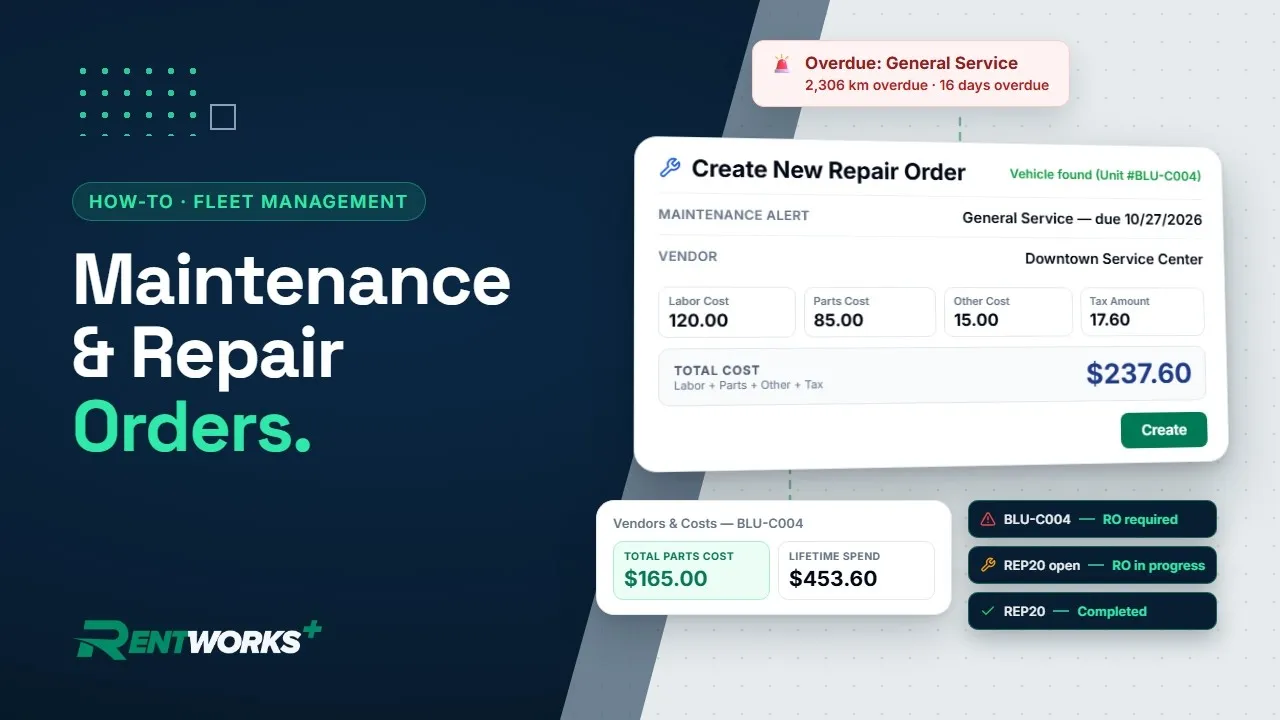
- 2Open Vehicle Fleet from the sidebar and click the car. Its Maintenance block shows Last Service and Next Service. If the car is overdue, a red banner says by how much.
- 3Open a car that's in the shop and you'll see the Vehicle grounded popup: the car can't be rented until the reason it lists is resolved. Click Dismiss.
- 4Open Repair Orders, click Create Repair Order and pick the car under Unit Number. Odometer Out and Location Out fill in for you.
- 5Under Maintenance Alert, pick the service that's due. That links it to the order and fills in the Description. Choose your Vendor, then set the dates, Location In and Odometer In.
- 6Enter Labor Cost, Parts Cost, Other Cost and Tax Amount, and Total Cost adds them up. Tick Warranty Repair if a warranty covers the work, then click Create. The new order shows as Open.
- 7Check Vehicle Fleet. A red triangle by the unit means the car needs a repair order, and an amber wrench means one is in progress. Non-Revenue shows the same flags.
- 8When the shop finishes the work, click Close on the order's row in Repair Orders. The order turns Completed and read-only, and the flag clears. If the linked service recurs, RentWorks Plus schedules the next one.
- 9If a car is still held out of service, use Return to Service on its record to set it back.
- 10Open the car's record and click Vendors & Costs. Lifetime spend adds up its repair orders.
Go deeper: Fleet maintenance · Repair orders · Fleet management
Video transcript
Hey there, and welcome back to Fleet Management in RentWorks Plus! Cars rack up kilometers, and sooner or later one rolls past its next service. Every car that's due gets flagged, and cars in the shop can't be rented. Let's follow one.
Start on the Dashboard. The Service runway card lists what's due. There's our Civic, overdue for its General Service.
Open Vehicle Fleet from the sidebar, and click the Civic. Its Maintenance block shows Last Service and Next Service. The red banner reads 2,306 kilometers overdue.
Now open an Altima that's in the shop. A popup says Vehicle grounded: it can't be rented until the reason below is resolved. Click Dismiss.
Open Repair Orders and click Create Repair Order. Pick the Civic under Unit Number, and Vehicle found appears. Odometer Out and Location Out fill in. Under Maintenance Alert, pick General Service to link the due service. Choose your Vendor, then set the dates, Location In, and Odometer In.
Enter Labor Cost, Parts Cost, Other Cost, and Tax Amount. Total Cost adds them up. The alert already wrote the Description. Covered by warranty? Tick Warranty Repair. This one isn't. Click Create, and it's listed as Open.
Check Vehicle Fleet. The Civic's red triangle is now an amber wrench. Red means a repair order's required. Amber means one's in progress. The flags follow the car's open maintenance alert. Non-Revenue shows them too.
Work done? In Repair Orders, click Close on the order's row. It's Completed and read-only. The Civic's flag clears, and its next General Service is scheduled. If a car's still held out of service, Return to Service on its record sets it back.
Open the Civic's record and click Vendors & Costs. Lifetime spend adds up both of its repair orders.
Every Monday morning, the Weekly summary emails what's due in the next seven days. The Monthly summary covers registrations expiring soon, on the 1st of each month. The Fleet Maintenance & Compliance report lists what's due and your repair orders. Your fleet, on track.
The Fleet Management series
-
01
-
02
-
03
-
04