
Skip to main content
RentWorks Plus Bluebird Auto Rental Systems Book a Demo
REPORTING AND ANALYTICS

Review current rental operations before the reporting period closes

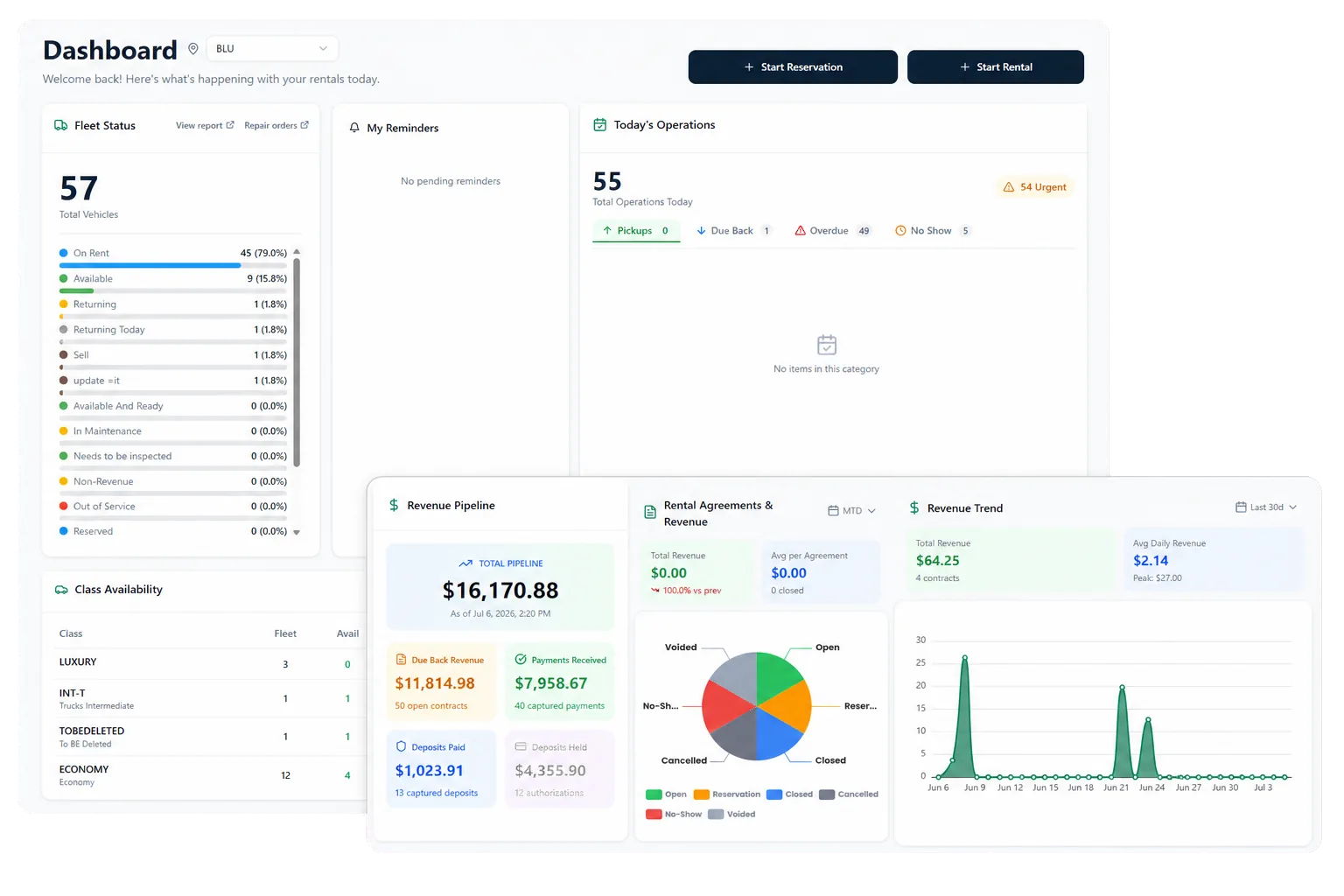
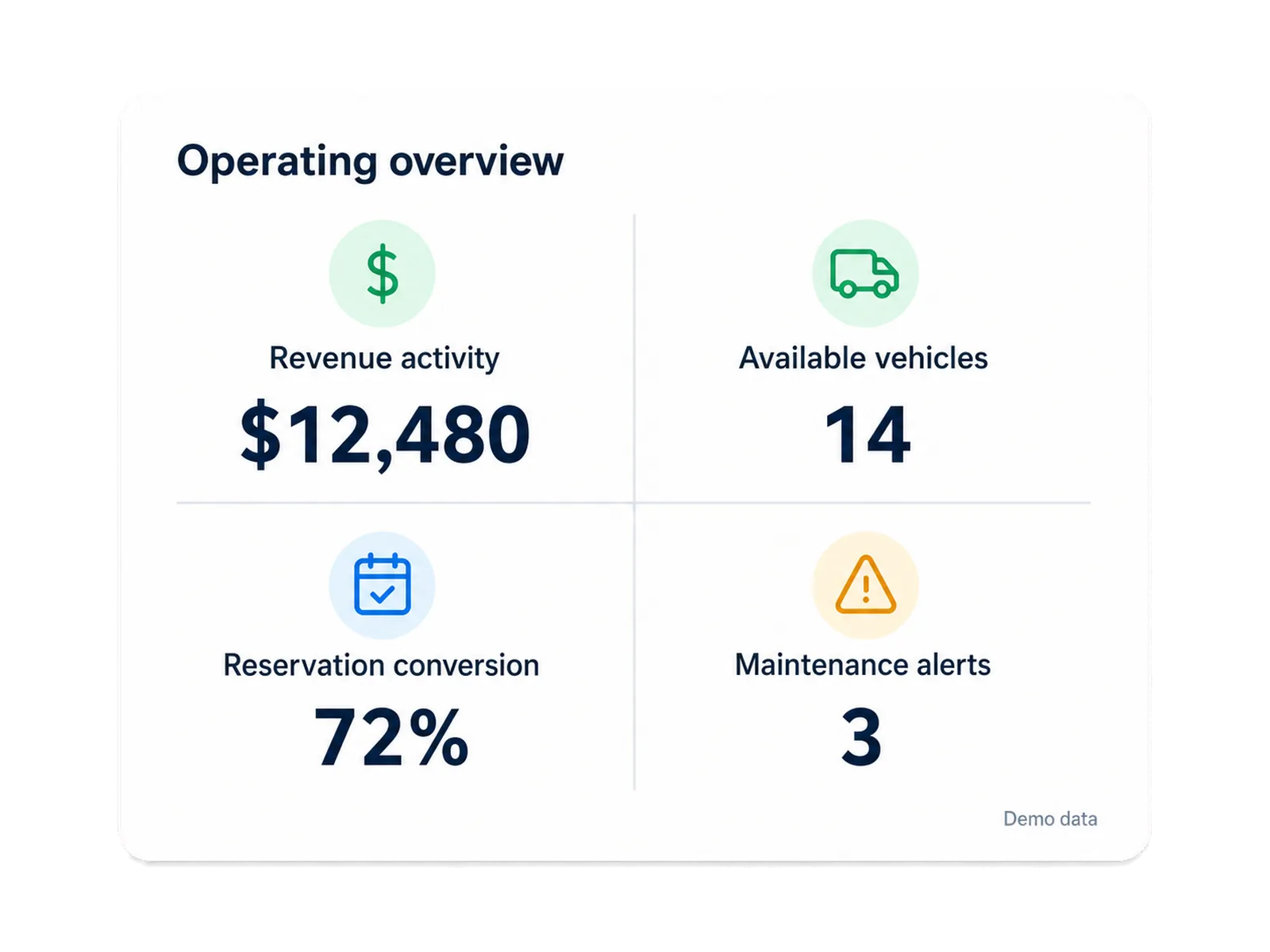
Use four working views for revenue activity, fleet and vehicle status, reservation conversion and no-shows, and maintenance alerts, with supported CSV exports.
Built on RentWorks PlusSSAE-18 hosted40+ years in rental
rentworksplus.com/platform/reporting-analytics Live
Review current rental operations before the reporting period closes
What you get
Operating areasTraceabilityMetric definitionsRole-based views
01

Start with four working areas of the rental operation

RentWorks Plus reporting is organized around revenue activity, fleet and vehicle status, reservation conversion and no-shows, and maintenance alerts. These views give owners, managers, fleet teams, and finance staff a current operating picture tied to rental records.

The views are designed for operating review without claiming a fixed update interval or accounting conclusions. Refresh behavior depends on the source and screen, while metric definitions depend on the business rules your team adopts.

Review revenue activity, including supported pending activity, deposits, and closed agreements.

Review fleet and vehicle status with availability and utilization context.

Review reservation conversion and no-show activity using agreed status definitions.

Review maintenance alerts for supported due and overdue work.

● Spotlight

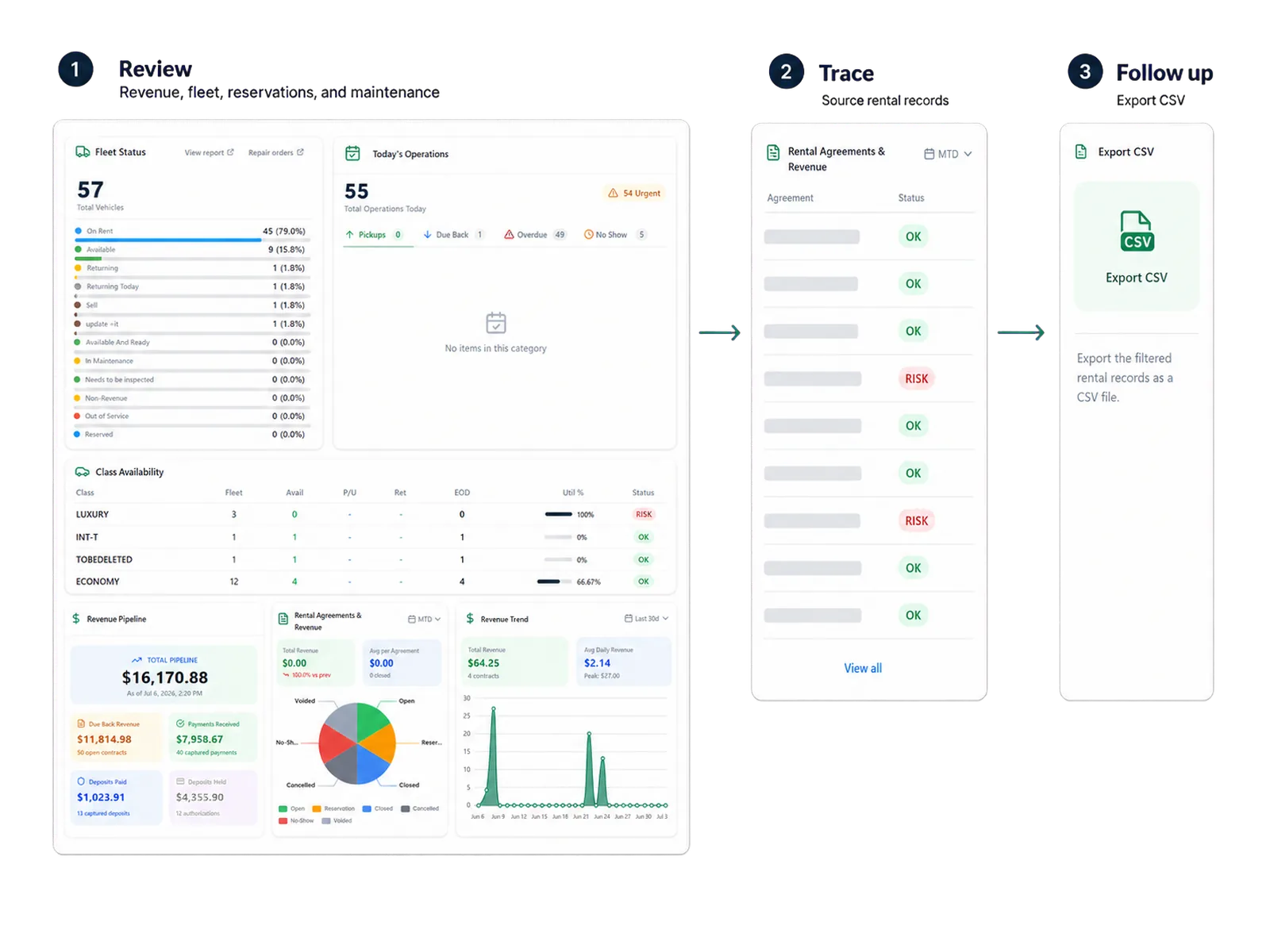
Trace a number back to the operating record

A dashboard number becomes more useful when a manager can follow it to the reservations, vehicles, agreements, payments, or service records behind it. That connection helps the team distinguish a real operating issue from a definition, timing, or data-entry question.
Trace a number back to the operating record

RentWorks Plus keeps the reporting view close to the rental-day context. Staff still need permissions, agreed definitions, and a review process for corrections or exceptions.

02

Define each metric before comparing locations or periods

A no-show needs a status rule. Reservation conversion needs a date and event. Utilization needs a denominator. Revenue activity needs a rule for pending items, deposits, and closed agreements. Maintenance alerts need a due or overdue definition.

Write those definitions down before using the measures in a branch comparison, incentive, forecast, or purchasing decision. Shared definitions help the organization compare the same thing across teams and reporting periods.

In practice

Give each role the view it needs

Owners and managers may start with operating trends and exceptions. Fleet teams may focus on status, availability, utilization context, and maintenance. Finance staff may review revenue activity, deposits, balances, refunds, and payment records.

Users, roles, configured permissions, and selected field controls can limit access to supported information. The configured view should match the decisions and responsibilities attached to each role.
Give each role the view it needs
03

Export supported reports for further analysis

Supported reports can be exported to CSV for further analysis or authorized sharing. A CSV can help finance, operations, or management apply its own model while retaining a defined source for the exported fields.

Export does not mean each field, document, report, or history record is available in the same format. The supported report and field list follows the configured setup and access rules.

04

Use evidence before turning a dashboard into a result claim

Sample percentages and interface values should be treated as demonstration data unless a named customer, baseline, period, method, and reviewer support them. The same rule applies to modeled lost revenue and projected outcomes.

RentWorks Plus can organize the operating inputs. Your team defines the measure and verifies the conclusion before using it in a business case, customer story, or public claim.

Workflow

How it flows

Three moments that make this real inside a working rental day.

1

Input

Start with four working areas of the rental operation

2

Working state

Define each metric before comparing locations or periods

3

Outcome

Use evidence before turning a dashboard into a result claim

FAQ

Answers before your demo

Common questions from operators evaluating this capability.

What are the four RentWorks Plus dashboard areas?

The four working areas are revenue activity; fleet and vehicle status; reservation conversion and no-shows; and maintenance alerts.

Can reports be exported?

Supported reports can be exported to CSV for further analysis or authorized sharing. Report, field, history, and access coverage depend on the configured setup.

Is the dashboard real time?

RentWorks Plus provides current operational views. Refresh behavior depends on the data source, update trigger, screen, cache, and reconciliation process.

How should utilization and no-shows be measured?

Use written definitions. Utilization needs a stated denominator, while a no-show needs a status rule and reporting date. Shared definitions make branch and period comparisons meaningful.

Bring your operating definitions to the demo

Show us the revenue, fleet, reservation, or maintenance question your team reviews and follow the records behind the measure.

REPORTING AND ANALYTICS

Review current rental operations before the reporting period closes

Use four working views for revenue activity, fleet and vehicle status, reservation conversion and no-shows, and maintenance alerts, with supported CSV exports.

Built on RentWorks PlusSSAE-18 hosted40+ years in rental
rentworksplus.com/platform/reporting-analytics Live
Review current rental operations before the reporting period closes
What you get
Operating areasTraceabilityMetric definitionsRole-based views
01

Start with four working areas of the rental operation

RentWorks Plus reporting is organized around revenue activity, fleet and vehicle status, reservation conversion and no-shows, and maintenance alerts. These views give owners, managers, fleet teams, and finance staff a current operating picture tied to rental records.

The views are designed for operating review without claiming a fixed update interval or accounting conclusions. Refresh behavior depends on the source and screen, while metric definitions depend on the business rules your team adopts.

Review revenue activity, including supported pending activity, deposits, and closed agreements.

Review fleet and vehicle status with availability and utilization context.

Review reservation conversion and no-show activity using agreed status definitions.

Review maintenance alerts for supported due and overdue work.

● Spotlight

Trace a number back to the operating record

A dashboard number becomes more useful when a manager can follow it to the reservations, vehicles, agreements, payments, or service records behind it. That connection helps the team distinguish a real operating issue from a definition, timing, or data-entry question.

Trace a number back to the operating record

RentWorks Plus keeps the reporting view close to the rental-day context. Staff still need permissions, agreed definitions, and a review process for corrections or exceptions.

02

Define each metric before comparing locations or periods

A no-show needs a status rule. Reservation conversion needs a date and event. Utilization needs a denominator. Revenue activity needs a rule for pending items, deposits, and closed agreements. Maintenance alerts need a due or overdue definition.

Write those definitions down before using the measures in a branch comparison, incentive, forecast, or purchasing decision. Shared definitions help the organization compare the same thing across teams and reporting periods.

In practice

Give each role the view it needs

Owners and managers may start with operating trends and exceptions. Fleet teams may focus on status, availability, utilization context, and maintenance. Finance staff may review revenue activity, deposits, balances, refunds, and payment records.

Users, roles, configured permissions, and selected field controls can limit access to supported information. The configured view should match the decisions and responsibilities attached to each role.

Give each role the view it needs
03

Export supported reports for further analysis

Supported reports can be exported to CSV for further analysis or authorized sharing. A CSV can help finance, operations, or management apply its own model while retaining a defined source for the exported fields.

Export does not mean each field, document, report, or history record is available in the same format. The supported report and field list follows the configured setup and access rules.

04

Use evidence before turning a dashboard into a result claim

Sample percentages and interface values should be treated as demonstration data unless a named customer, baseline, period, method, and reviewer support them. The same rule applies to modeled lost revenue and projected outcomes.

RentWorks Plus can organize the operating inputs. Your team defines the measure and verifies the conclusion before using it in a business case, customer story, or public claim.

Workflow

How it flows

Three moments that make this real inside a working rental day.

1

Input

Start with four working areas of the rental operation

2

Working state

Define each metric before comparing locations or periods

3

Outcome

Use evidence before turning a dashboard into a result claim

FAQ

Answers before your demo

Common questions from operators evaluating this capability.

What are the four RentWorks Plus dashboard areas?

The four working areas are revenue activity; fleet and vehicle status; reservation conversion and no-shows; and maintenance alerts.

Can reports be exported?

Supported reports can be exported to CSV for further analysis or authorized sharing. Report, field, history, and access coverage depend on the configured setup.

Is the dashboard real time?

RentWorks Plus provides current operational views. Refresh behavior depends on the data source, update trigger, screen, cache, and reconciliation process.

How should utilization and no-shows be measured?

Use written definitions. Utilization needs a stated denominator, while a no-show needs a status rule and reporting date. Shared definitions make branch and period comparisons meaningful.

Bring your operating definitions to the demo

Show us the revenue, fleet, reservation, or maintenance question your team reviews and follow the records behind the measure.