
Skip to main content
RentWorks Plus Bluebird Auto Rental Systems Book a Demo
DEALERSHIP LOANER MANAGEMENT

Dealership loaner management software that documents every handoff and bills the right party.

RentWorks Plus connects the customer, vehicle, agreement, signature, condition record, return details, payment activity and service history for the dealership loaner day, from self-pay loaners to insurance replacement vehicles and claim subrogation.
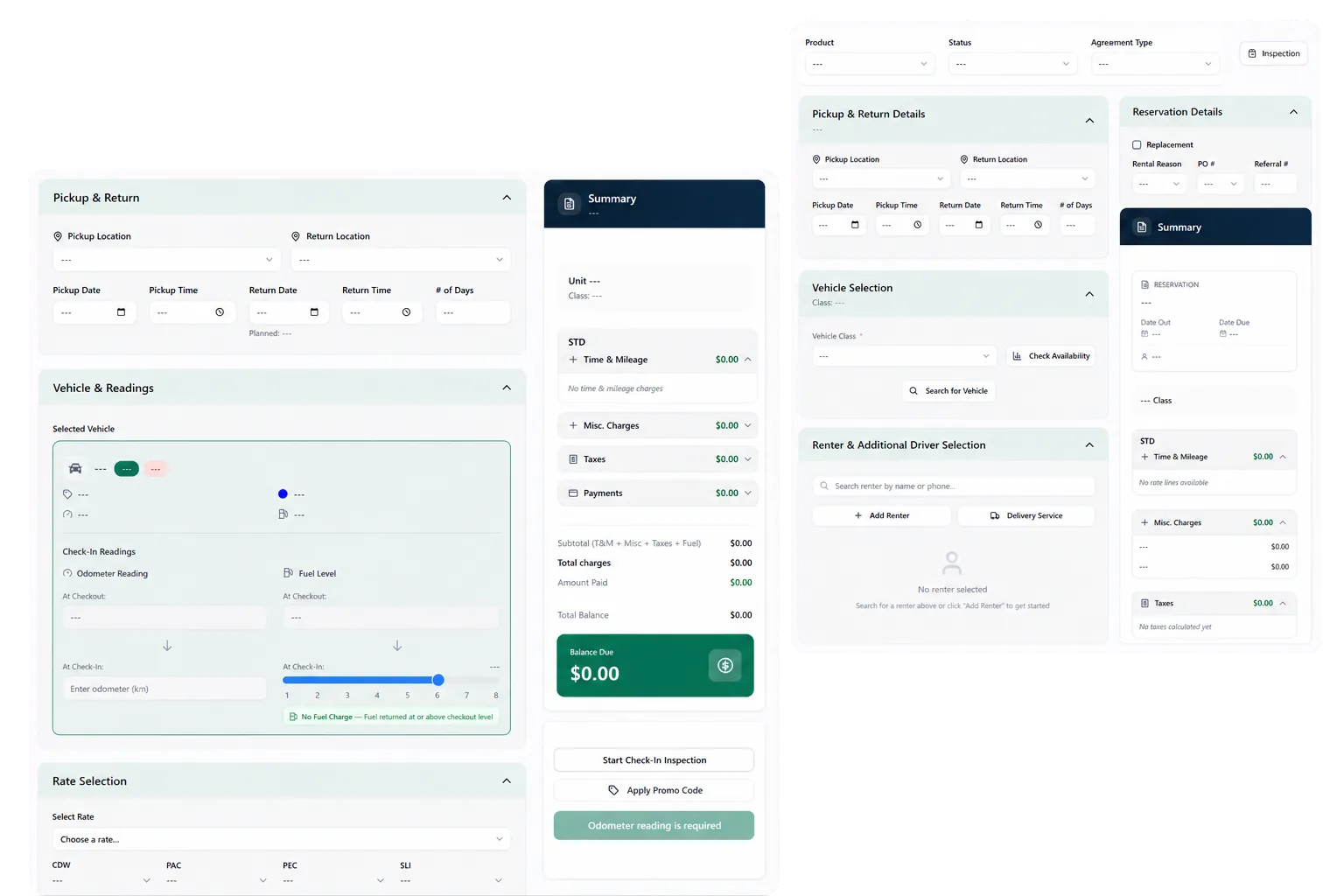
Deployed in weeksConfigurable to your processOne connected rental day
rentworksplus.com/solutions/dealership-loaner Live
Document each loaner handoff and review charges against the agreement.
What changes
Loaner agreementsDocumented handoffReplacement & subrogationVehicle historyManager review
01

Manage the loaner as a rental record

A dealership loaner carries a customer, driver, vehicle, agreement, condition record, mileage, payment details, and return decision. RentWorks Plus keeps those records connected so service staff can review the handoff without rebuilding the file from paper, email, and photo folders.

The platform can work alongside other dealership systems. Your implementation plan should state which system owns the customer, repair order, vehicle, payment, and loaner agreement, plus how approved data moves between them.

● Spotlight

Prepare a documented handoff

Staff can prepare a supported rental agreement with customer, driver, rate, deposit, charge, coverage, and term details. Where configured, Signiphi supports on-screen or remote signatures for approved rental documents.
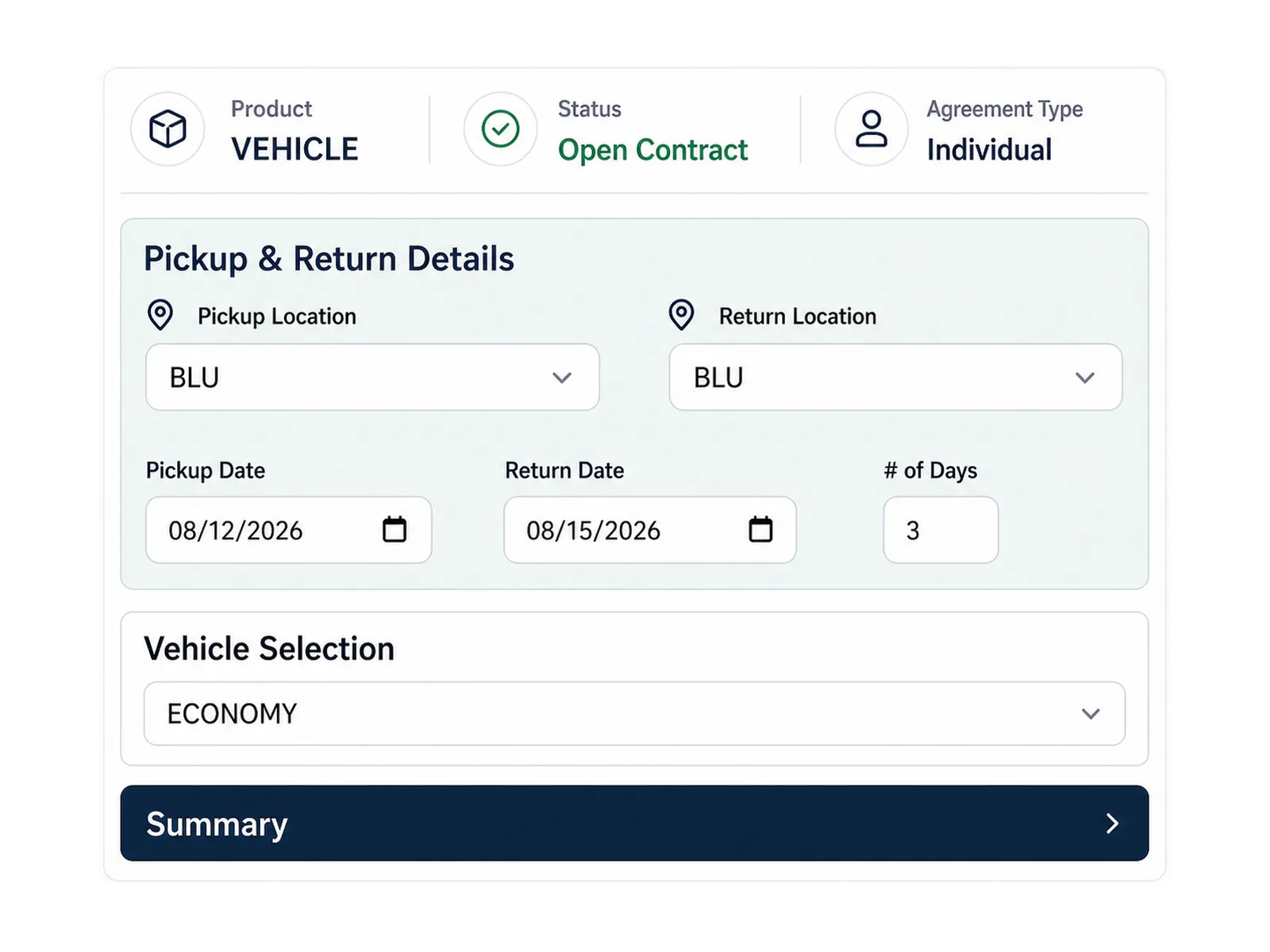
Prepare a documented handoff

Condition photos can remain tied to the rental and vehicle history. Staff can confirm starting mileage, fuel level, vehicle condition, and required acknowledgements before the vehicle leaves. The agreement and inspection record give the return team a defined starting point.

02

Keep vehicle history available for service review

Fleet records can hold unit status, availability, classification, service history, and supported holds. Repair orders can record shop work and cost against the vehicle. Maintenance records can track due work and supported time or mileage thresholds.

This history helps service and loaner staff review the same vehicle context. It does not establish resale value, certified-preowned eligibility, insurance treatment, or a guaranteed recovery amount.

In practice

Give managers a repeatable review process

Managers can review supported rental, fleet, payment, balance, claim, and maintenance activity through product reports and CSV exports. Agree on definitions before using a metric to judge a branch or service team.

A useful review starts with a source record. Select a missed return step, open balance, unavailable vehicle, or condition question. Confirm who owns the next action and which evidence supports it.
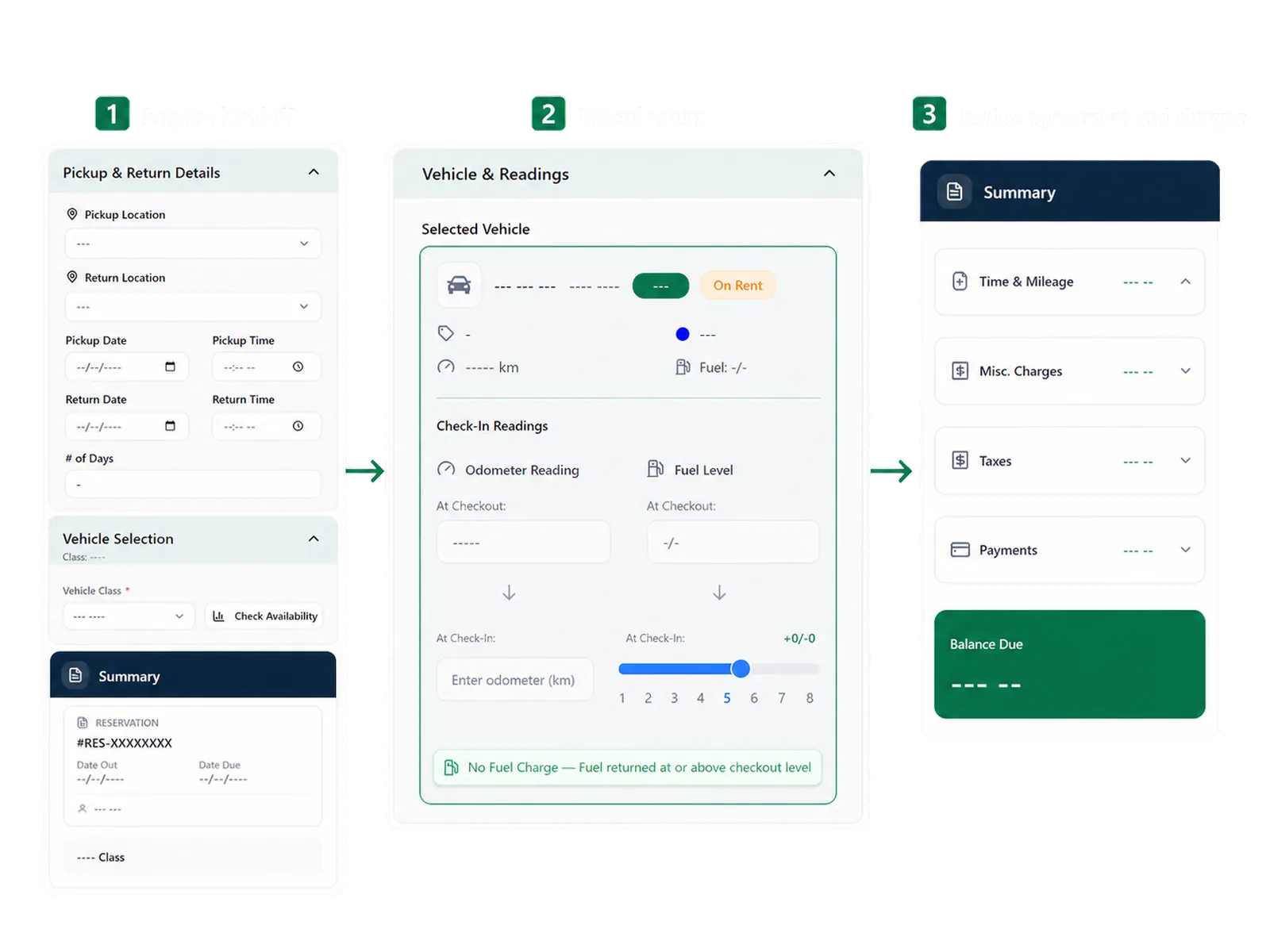
Give managers a repeatable review process
03

Bill the right party and document the claim

A loaner day does not always end with the driver paying. The vehicle may be in for warranty or goodwill service, or in a body shop after a collision where an insurance carrier or responsible third party covers the rental. RentWorks Plus can record the payer on the agreement, driver, corporate account, dealership, warranty program, or insurance carrier, so the responsible party, rate, coverage, and charges are documented from the start. Operators who work only in replacement can bill the carrier or third party from the same record instead of a walk-up customer.

When a cost is recoverable from a carrier or responsible party, the claims workflow can hold the claim details, carrier, expenses, supporting condition and charge records, and settlement, and track subrogation status. RentWorks Plus documents and tracks the claim, it does not act as an insurance adjuster, determine coverage, or guarantee a recovery amount.

Workflow

How teams adopt it

Three moments that make this real inside a working rental day.

1

Start

Manage the loaner as a rental record

2

Adopt

Prepare a documented handoff

3

Operate

Run your loaner

FAQ

Answers before your demo

Common questions from operators evaluating this capability.

Does RentWorks Plus replace our dealership management system?

RentWorks Plus manages the rental and loaner workflow. It can work beside dealership systems, but your proposal and implementation plan should define integrations, data ownership, record handoffs, and support responsibilities.

Can we document vehicle condition at pickup and return?

Yes. RentWorks Plus supports structured condition photos tied to the rental and vehicle history. Staff review the agreement, photos, notes, and policy before deciding how to handle a condition change.

Which loaner workflow should we see in a demo?

Ask to see customer and driver setup, vehicle assignment, agreement preparation, signature, pickup condition, return mileage and fuel, condition comparison, configured charges, payment activity, export, and manager reporting.

Can we run replacement or insurance-billed rentals, not just self-pay loaners?

Yes. The payer on an agreement can be the driver, a corporate account, the dealership, a warranty program, or an insurance carrier. Operators who work only in replacement can bill the responsible party and keep the claim reference on the same rental record.

Does RentWorks Plus recover money from the insurance carrier for us?

No. RentWorks Plus documents the claim and tracks its subrogation status — carrier, responsible party, expenses, supporting records, and settlement. It does not decide coverage or guarantee a recovery amount; that stays with the carrier and adjuster.

Review the return against recorded facts

At return, staff can record mileage, fuel, condition, payment activity, and configured charges. The team can compare pickup and return records, review the agreement rules, and decide how to handle an exception or dispute.

DEALERSHIP LOANER MANAGEMENT

Dealership loaner management software that documents every handoff and bills the right party.

RentWorks Plus connects the customer, vehicle, agreement, signature, condition record, return details, payment activity and service history for the dealership loaner day, from self-pay loaners to insurance replacement vehicles and claim subrogation.

Deployed in weeksConfigurable to your processOne connected rental day
rentworksplus.com/solutions/dealership-loaner Live
Document each loaner handoff and review charges against the agreement.
What changes
Loaner agreementsDocumented handoffReplacement & subrogationVehicle historyManager review
01

Manage the loaner as a rental record

A dealership loaner carries a customer, driver, vehicle, agreement, condition record, mileage, payment details, and return decision. RentWorks Plus keeps those records connected so service staff can review the handoff without rebuilding the file from paper, email, and photo folders.

The platform can work alongside other dealership systems. Your implementation plan should state which system owns the customer, repair order, vehicle, payment, and loaner agreement, plus how approved data moves between them.

● Spotlight

Prepare a documented handoff

Staff can prepare a supported rental agreement with customer, driver, rate, deposit, charge, coverage, and term details. Where configured, Signiphi supports on-screen or remote signatures for approved rental documents.

Prepare a documented handoff

Condition photos can remain tied to the rental and vehicle history. Staff can confirm starting mileage, fuel level, vehicle condition, and required acknowledgements before the vehicle leaves. The agreement and inspection record give the return team a defined starting point.

02

Keep vehicle history available for service review

Fleet records can hold unit status, availability, classification, service history, and supported holds. Repair orders can record shop work and cost against the vehicle. Maintenance records can track due work and supported time or mileage thresholds.

This history helps service and loaner staff review the same vehicle context. It does not establish resale value, certified-preowned eligibility, insurance treatment, or a guaranteed recovery amount.

In practice

Give managers a repeatable review process

Managers can review supported rental, fleet, payment, balance, claim, and maintenance activity through product reports and CSV exports. Agree on definitions before using a metric to judge a branch or service team.

A useful review starts with a source record. Select a missed return step, open balance, unavailable vehicle, or condition question. Confirm who owns the next action and which evidence supports it.

Give managers a repeatable review process
03

Bill the right party and document the claim

A loaner day does not always end with the driver paying. The vehicle may be in for warranty or goodwill service, or in a body shop after a collision where an insurance carrier or responsible third party covers the rental. RentWorks Plus can record the payer on the agreement, driver, corporate account, dealership, warranty program, or insurance carrier, so the responsible party, rate, coverage, and charges are documented from the start. Operators who work only in replacement can bill the carrier or third party from the same record instead of a walk-up customer.

When a cost is recoverable from a carrier or responsible party, the claims workflow can hold the claim details, carrier, expenses, supporting condition and charge records, and settlement, and track subrogation status. RentWorks Plus documents and tracks the claim, it does not act as an insurance adjuster, determine coverage, or guarantee a recovery amount.

Workflow

How teams adopt it

Three moments that make this real inside a working rental day.

1

Start

Manage the loaner as a rental record

2

Adopt

Prepare a documented handoff

3

Operate

Run your loaner

FAQ

Answers before your demo

Common questions from operators evaluating this capability.

Does RentWorks Plus replace our dealership management system?

RentWorks Plus manages the rental and loaner workflow. It can work beside dealership systems, but your proposal and implementation plan should define integrations, data ownership, record handoffs, and support responsibilities.

Can we document vehicle condition at pickup and return?

Yes. RentWorks Plus supports structured condition photos tied to the rental and vehicle history. Staff review the agreement, photos, notes, and policy before deciding how to handle a condition change.

Which loaner workflow should we see in a demo?

Ask to see customer and driver setup, vehicle assignment, agreement preparation, signature, pickup condition, return mileage and fuel, condition comparison, configured charges, payment activity, export, and manager reporting.

Can we run replacement or insurance-billed rentals, not just self-pay loaners?

Yes. The payer on an agreement can be the driver, a corporate account, the dealership, a warranty program, or an insurance carrier. Operators who work only in replacement can bill the responsible party and keep the claim reference on the same rental record.

Does RentWorks Plus recover money from the insurance carrier for us?

No. RentWorks Plus documents the claim and tracks its subrogation status — carrier, responsible party, expenses, supporting records, and settlement. It does not decide coverage or guarantee a recovery amount; that stays with the carrier and adjuster.

Review the return against recorded facts

At return, staff can record mileage, fuel, condition, payment activity, and configured charges. The team can compare pickup and return records, review the agreement rules, and decide how to handle an exception or dispute.