
Skip to main content
RentWorks Plus Bluebird Auto Rental Systems Book a Demo
INDEPENDENT FRANCHISE RENTAL OPERATIONS

Franchise car rental software that meets brand requirements without slowing the local rental day.

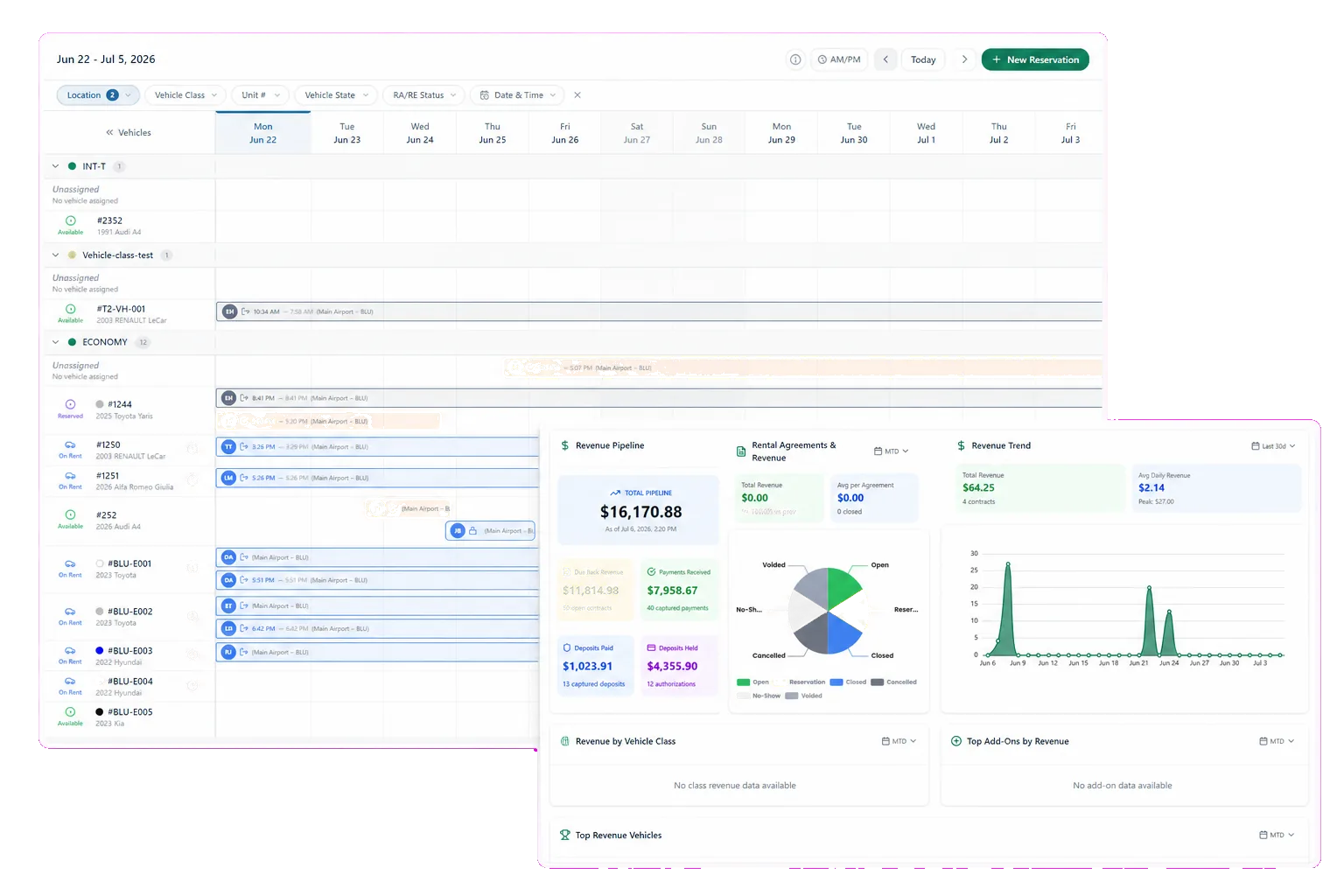
RentWorks Plus connects reservation, fleet, customer, payment, inspection, and reporting records while supporting the location controls and role access an independent franchise needs.
Deployed in weeksConfigurable to your processOne connected rental day
rentworksplus.com/solutions/franchise-rental-software Live
Meet franchise requirements without slowing the local rental day.
What changes
One rental recordRoles and accessException visibilityReporting
01

Use one rental record for local work and required reporting

An independent franchise balances brand reporting with local demand, staffing, weather, vehicle service, and customer exceptions. RentWorks Plus keeps the reservation, customer, vehicle, agreement, payment activity, condition record, and related fleet work in one operating context.

Shared records reduce the need to reconstruct a rental before a report or review. Your team still defines the required data, metric definitions, branch rules, and approval path.

Use the same status definitions from reservation through report. A no-show, canceled reservation, unavailable vehicle, open balance, or service hold needs a defined meaning that local staff and franchise reviewers share.

● Spotlight

Configure users, roles, and location controls

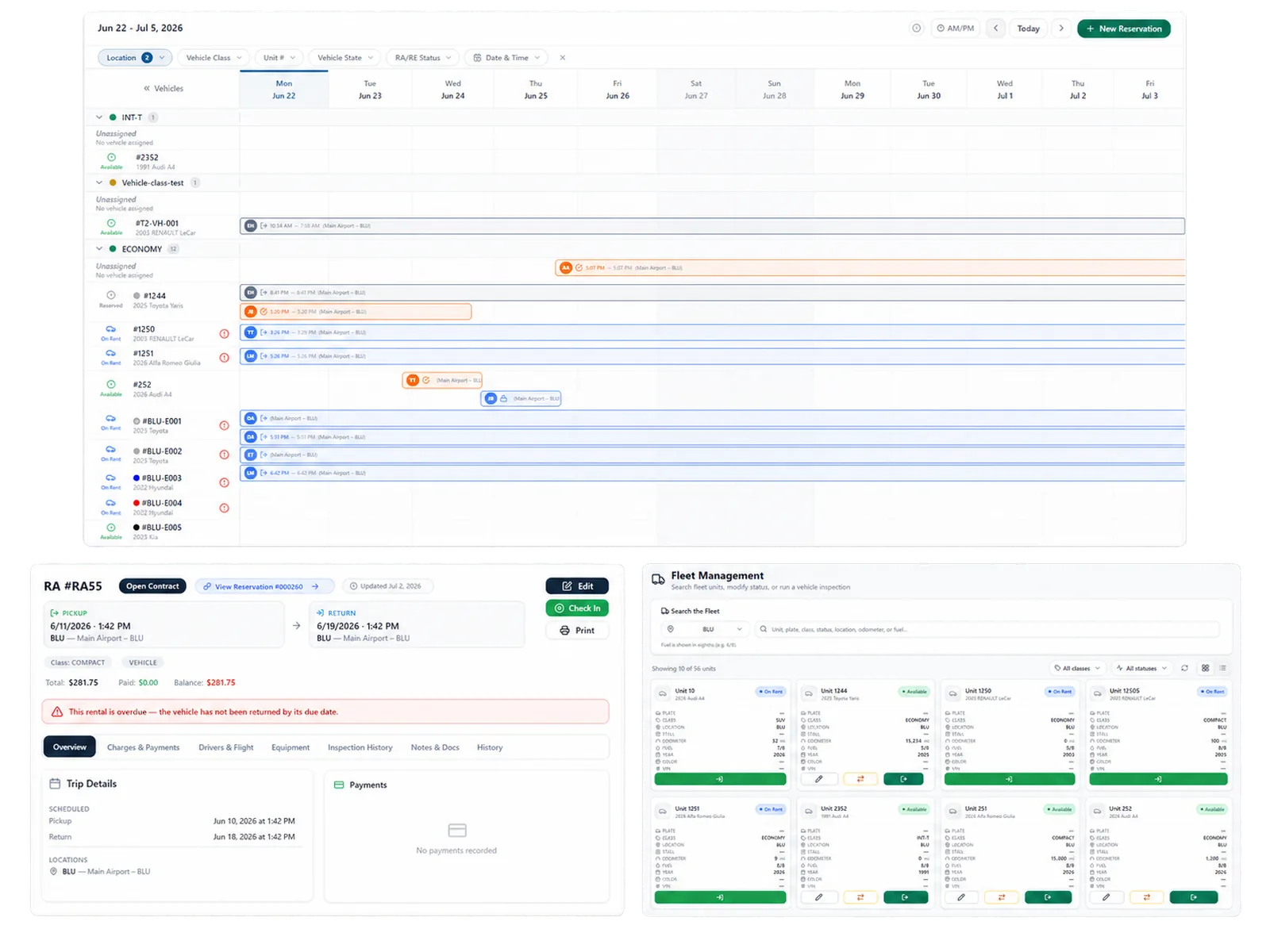
Administrators can manage multiple locations, users, roles, approved permissions, selected audit history, and supported customer fields. Location-aware settings can support rates, counters, users, and reporting views within the configured environment.
Configure users, roles, and location controls

Document who may change rates, reassign vehicles, issue refunds, edit customer fields, export reports, and approve exceptions. Bring those roles to the demo and test their access.

02

Keep fleet and reservation exceptions in view

The visual planner shows scheduled arrivals, departures, active rentals, and vehicle assignments. Fleet records add status, availability, service history, and supported holds. Staff can review this context before committing a unit or changing a booking.

Use a late return, one-way movement, vehicle substitution, or maintenance hold in the demo. Ask how the change affects availability and which record shows the reason.

In practice

Build reports on defined source records

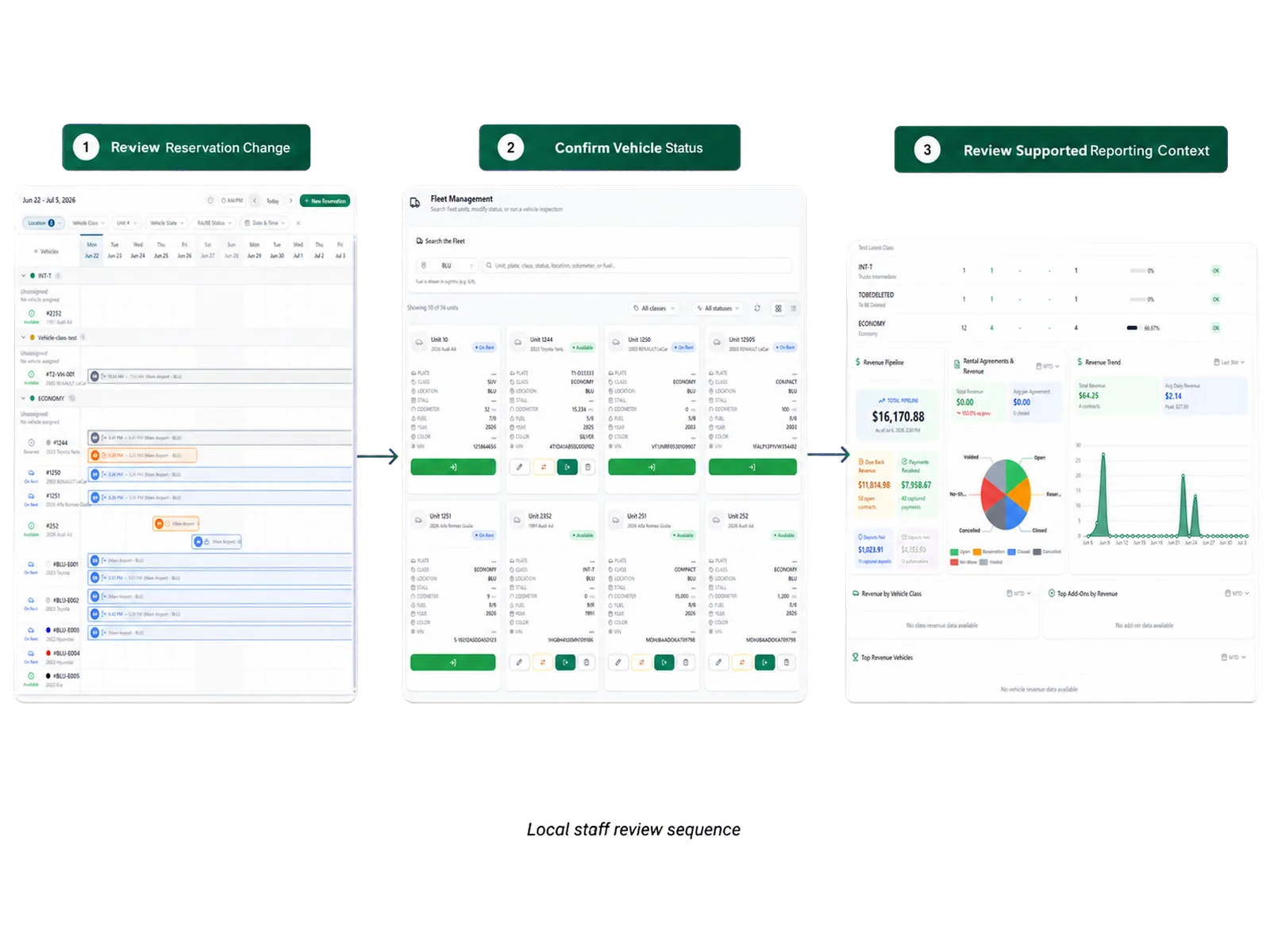
RentWorks Plus provides operational views for revenue activity, fleet and vehicle status, reservation conversion and no-shows, and maintenance alerts. Authorized users can export supported reports to CSV.

Bring the report your franchise requires. Confirm fields, filters, status definitions, refresh behavior, authorized access, and export format. If a required measure needs work outside RentWorks Plus, include that step in the operating plan.
Build reports on defined source records
03

Keep partner products separate from native scope

Electronic signature, tokenized card workflows, online booking, AI-assisted inspection, voice intake, and telematics may depend on integrations or optional products. Their records, geography, costs, and support paths can differ.

Ask the proposal to identify the provider, supported workflow, data direction, staff review step, contract owner, and support owner for each dependency.

04

Map a franchise exception from start to report

Choose a rental that tests local control and reporting. Include a changed reservation, vehicle issue, payment exception, condition question, and required report output.

Ask the demo team to show the staff action, permission, source record, selected history, and report effect. Use the same scenario when comparing vendors and quotes.

Document any work that depends on a spreadsheet, external portal, partner product, or manual approval. Include those steps and owners in the implementation scope.

Use a status change that affects availability.

Test the access of a local manager and reviewer.

Produce the required franchise report from the scenario.

Confirm the source of each required report field.

Workflow

How teams adopt it

Three moments that make this real inside a working rental day.

1

Start

Use one rental record for local work and required reporting

2

Adopt

Keep fleet and reservation exceptions in view

3

Operate

Map a franchise exception from start to report

FAQ

Answers before your demo

Common questions from operators evaluating this capability.

Is RentWorks Plus limited to large franchise groups?

No. A single independent franchise can use connected rental records, configured roles, location controls, and supported reporting. The right scope depends on its fleet, workflows, data, and franchise requirements.

Can local rules differ by location?

RentWorks Plus supports location-aware configuration and approved role access. Confirm the exact rate, user, counter, vehicle, customer-field, and report controls your operating model requires.

Can it produce our franchise report?

RentWorks Plus supports operational reports and CSV exports, but report fields and definitions vary. Bring the required format to the demo and confirm each source field, filter, calculation, and output.

Bring your franchise workflow and report

Show us the local decisions your team owns and the reporting your brand requires. We will use both to frame the demo.

INDEPENDENT FRANCHISE RENTAL OPERATIONS

Franchise car rental software that meets brand requirements without slowing the local rental day.

RentWorks Plus connects reservation, fleet, customer, payment, inspection, and reporting records while supporting the location controls and role access an independent franchise needs.

Deployed in weeksConfigurable to your processOne connected rental day
rentworksplus.com/solutions/franchise-rental-software Live
Meet franchise requirements without slowing the local rental day.
What changes
One rental recordRoles and accessException visibilityReporting
01

Use one rental record for local work and required reporting

An independent franchise balances brand reporting with local demand, staffing, weather, vehicle service, and customer exceptions. RentWorks Plus keeps the reservation, customer, vehicle, agreement, payment activity, condition record, and related fleet work in one operating context.

Shared records reduce the need to reconstruct a rental before a report or review. Your team still defines the required data, metric definitions, branch rules, and approval path.

Use the same status definitions from reservation through report. A no-show, canceled reservation, unavailable vehicle, open balance, or service hold needs a defined meaning that local staff and franchise reviewers share.

● Spotlight

Configure users, roles, and location controls

Administrators can manage multiple locations, users, roles, approved permissions, selected audit history, and supported customer fields. Location-aware settings can support rates, counters, users, and reporting views within the configured environment.

Configure users, roles, and location controls

Document who may change rates, reassign vehicles, issue refunds, edit customer fields, export reports, and approve exceptions. Bring those roles to the demo and test their access.

02

Keep fleet and reservation exceptions in view

The visual planner shows scheduled arrivals, departures, active rentals, and vehicle assignments. Fleet records add status, availability, service history, and supported holds. Staff can review this context before committing a unit or changing a booking.

Use a late return, one-way movement, vehicle substitution, or maintenance hold in the demo. Ask how the change affects availability and which record shows the reason.

In practice

Build reports on defined source records

RentWorks Plus provides operational views for revenue activity, fleet and vehicle status, reservation conversion and no-shows, and maintenance alerts. Authorized users can export supported reports to CSV.

Bring the report your franchise requires. Confirm fields, filters, status definitions, refresh behavior, authorized access, and export format. If a required measure needs work outside RentWorks Plus, include that step in the operating plan.

Build reports on defined source records
03

Keep partner products separate from native scope

Electronic signature, tokenized card workflows, online booking, AI-assisted inspection, voice intake, and telematics may depend on integrations or optional products. Their records, geography, costs, and support paths can differ.

Ask the proposal to identify the provider, supported workflow, data direction, staff review step, contract owner, and support owner for each dependency.

04

Map a franchise exception from start to report

Choose a rental that tests local control and reporting. Include a changed reservation, vehicle issue, payment exception, condition question, and required report output.

Ask the demo team to show the staff action, permission, source record, selected history, and report effect. Use the same scenario when comparing vendors and quotes.

Document any work that depends on a spreadsheet, external portal, partner product, or manual approval. Include those steps and owners in the implementation scope.

Use a status change that affects availability.

Test the access of a local manager and reviewer.

Produce the required franchise report from the scenario.

Confirm the source of each required report field.

Workflow

How teams adopt it

Three moments that make this real inside a working rental day.

1

Start

Use one rental record for local work and required reporting

2

Adopt

Keep fleet and reservation exceptions in view

3

Operate

Map a franchise exception from start to report

FAQ

Answers before your demo

Common questions from operators evaluating this capability.

Is RentWorks Plus limited to large franchise groups?

No. A single independent franchise can use connected rental records, configured roles, location controls, and supported reporting. The right scope depends on its fleet, workflows, data, and franchise requirements.

Can local rules differ by location?

RentWorks Plus supports location-aware configuration and approved role access. Confirm the exact rate, user, counter, vehicle, customer-field, and report controls your operating model requires.

Can it produce our franchise report?

RentWorks Plus supports operational reports and CSV exports, but report fields and definitions vary. Bring the required format to the demo and confirm each source field, filter, calculation, and output.

Bring your franchise workflow and report

Show us the local decisions your team owns and the reporting your brand requires. We will use both to frame the demo.