Key Takeaways
- A digital vehicle inspection replaces the paper condition form with timestamped, geotagged photos mapped to named vehicle zones and attached to a rental agreement.
- A photo becomes evidence only when it carries four things: a system timestamp, location metadata, attribution to a named zone, and linkage to an agreement and signature.
- Recovering two $900 damage claims is worth $1,800 a year. Negotiating 5% off a $130 monthly premium is worth $78. Recovery is the lever you control.
- The after-hours key drop breaks the evidence chain, and renter self-inspection is what closes it, producing a zone-attributed record at 11:04pm instead of none.
- Most digital vehicle inspection software is built for repair shops, so it attaches inspections to work orders rather than to rental agreements and stops at the photos.
Small scratch, driver side.
You wrote that on the last damage form you filed. Six words, a ballpoint circle on a car outline, and a signature nobody read. It is not evidence. It will not survive a renter’s phone call to their card issuer, and it will not persuade an adjuster who has seen four thousand of them.
You know that. You have not fixed it, because at 7am with four people in line the clipboard is faster, and the walkaround you have time for is the one where you glance at the panels and hope.
Below: what a digital vehicle inspection is, which evidence holds up when a renter disputes the charge, how zone mapping works, how renter self-inspection closes the after-hours gap, and how to choose a system. Written for rental and dealership loaner fleets, not repair shops.
What is a digital vehicle inspection?
That last sentence carries the whole difference. A repair shop inspects to recommend work to the owner of the car. You inspect to prove condition against someone who does not own it and may dispute the charge. The photos look the same. The job does not.
What counts as evidence in a rental damage dispute
You are not documenting condition for your own records. You are building a file that three people have to believe, each applying a different standard: the renter, who has to be persuaded to pay rather than fight; their card issuer, if they dispute the charge; and your insurer, if the claim goes to the policy.
A paper form fails all three. A defensible record carries four things, and a worthless one is missing at least one of them.
The four elements that make a photo evidentiary
Miss any one of the four and the record weakens. Miss linkage and it collapses.
Damage with no usable evidence trail is one of nine places revenue leaks out of a rental operation. It is also the one that costs the most per incident.
What the card networks look for
Card networks evaluate documentation, not assertions. Visa’s Dispute Management Guidelines for Visa Merchants (June 2024) list what counts as compelling evidence: signed agreements, “details of identification presented by the Cardholder” at pickup, and photographic evidence linking the cardholder to the goods or services. A handwritten note on a paper form is in none of them, and the photographs are the piece most operators still handle badly.
Two operators, one $1,400 bumper
Operator A ran a zone-mapped inspection at check-out: 12 photos, each attached to a named panel, timestamped and geotagged. The renter e-signed the condition record and got a copy on their phone. Same 12 zones at check-in. The rear bumper photo at return shows a crease the check-out photo does not.
Operator B has a paper form reading small scratch, driver side and one photo of the whole car from fifteen feet away.
Run both through a dispute. Operator A submits a before/after pair of the same named panel, 41 hours apart, against a baseline the renter signed. Operator B submits a description. Operator A collects, and Operator B writes it off as the cost of doing business.
Do this this week
Pull your last five damage charges. For each one, ask a single question: could I produce a timestamped photograph of that panel, taken before the rental started?
Count how many times the answer is no. That number is your current exposure, and you can measure it in about twenty minutes.
How many vehicle zones should an inspection cover?
Now the part your insurer cares about.
“Driver side” describes roughly 40% of a vehicle’s exterior surface: a front fender, two doors, a quarter panel, a mirror, two wheels and a rocker. A dispute over which scratch is unwinnable when your record covers all of them and identifies none.
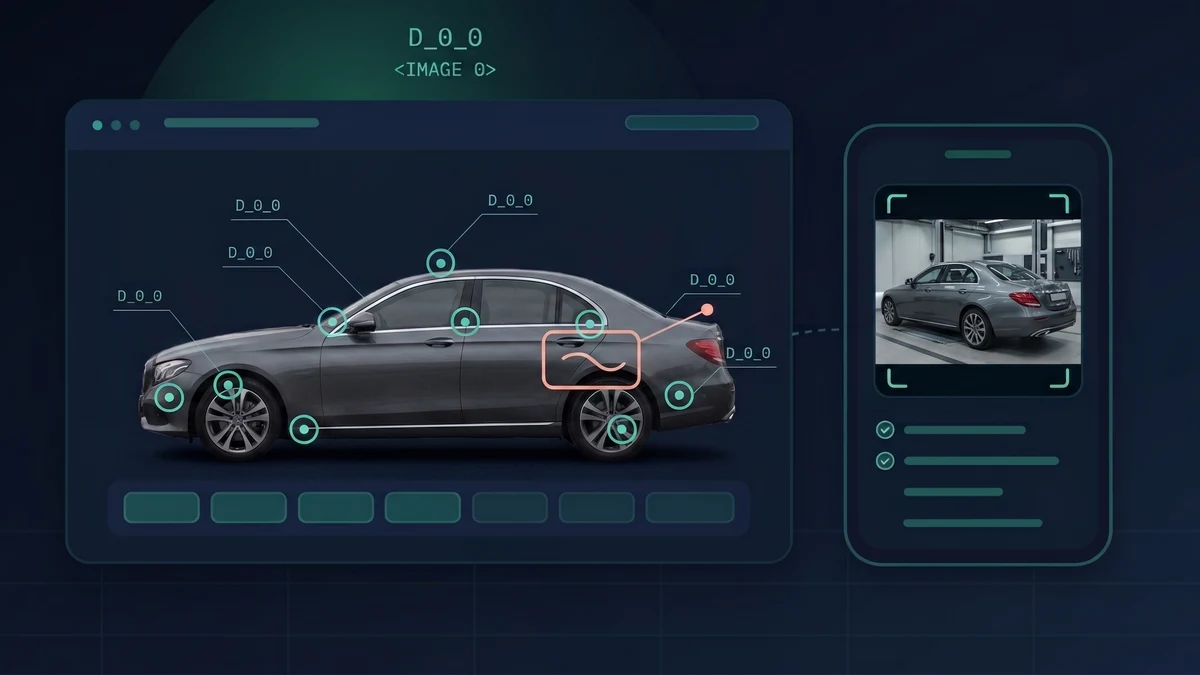
Zone mapping attaches every photo and every damage note to a named area on a vehicle diagram. Mature systems map 60 or more discrete zones per vehicle: the door skin separate from the door edge, each wheel separate from each tire. That granularity is what makes a record specific enough to argue from.
Zone-level records also build a damage history across the vehicle’s life rather than across one rental. You stop charging a pre-existing scuff to a new renter every few months, which is how operators lose corporate accounts, and new damage stands out instead of disappearing into a pile of undated photos.
Standardized severity scoring belongs here too. Two agents grade the same dent differently, one calling it light and one calling it moderate, and a renter’s representative will point straight at that inconsistency. A written severity scale removes the judgment call. Automated classification removes it further: AI-assisted damage detection now classifies findings across thousands of combinations of part, damage type and severity level, and produces the same grade whoever holds the phone.
Do this this week
Take your current condition form and count the zones on it. If it is under 20, you are producing a sketch rather than panel-level evidence.
What belongs on a digital vehicle inspection checklist
A rental inspection checklist is not a service-bay form. Two things do the work, and both are below: a written severity scale, so two agents grade the same dent the same way, and a four-point test for whether a photo will survive a dispute.
Copy them onto your own condition form and run a better walkaround tomorrow.
The severity scale
A written scale exists so that two agents give the same dent the same grade.
What makes a photo defensible: the four-point reference
- 1Timestamped by the system, not by the person holding the phone
- 2Geotagged at the hand-off location
- 3Attributed to a named zone, not a general area
- 4Linked to the rental agreement, the VIN and the renter’s signature
Print that on the back of your vehicle condition report. If a photo fails any of the four, it will not carry a dispute on its own.
Check-out and check-in: building a matched vehicle condition report
A single inspection proves nothing.
Check-out alone establishes a baseline and stops. Check-in alone shows damage without showing when it happened. The pair proves causation, and causation is the only thing under argument.
Four practical consequences:
- Same zones, both directions. Capture 12 zones at check-out and 8 at check-in, and the 4 you skipped are the 4 the renter will point at.
- Mileage and fuel captured as data, not a scribble. The two most-disputed line items on a rental invoice, and the two easiest to photograph.
- Signature at check-out, before the keys move. A renter who signs after the car comes back has acknowledged nothing.
- The renter gets a copy. A renter holding the record in their own inbox has a hard time claiming nobody showed them the damage.
The after-hours key drop
A car comes back at 11pm. Keys go through the slot. Nobody looks at it until 8am.
That is nine hours of unaccounted custody. You cannot show that the damage your agent finds at 8am happened during the rental rather than overnight in your own lot, so you eat the claim. Most operators eat it knowing they will. This is the point in the process where the evidence chain breaks, and it breaks for reasons that have nothing to do with how carefully your staff inspect.
Renter self-inspection: remote vehicle inspection on the customer’s phone
Renter self inspection means what it sounds like: the renter completes the walkaround on their own phone, at the moment they return the car. Some of the market calls this remote vehicle inspection, because it happens wherever the vehicle is, without your staff standing next to it.
On-screen vehicle outline overlays guide them to each capture point, showing where to stand and what to frame, and will not advance until they take the shot. No app install, and no 11pm callout for you. The renter produces the same timestamped, zone-attributed record your staff would, and it exists at 11:04pm instead of not existing at all.
The variable you do not control: compliance
Renter completion is the risk, and operators who assume it will take care of itself get disappointed. Four things drive it:
The behavioural effect worth more than the photos
When a renter documents the car themselves, at their own pace, and keeps a copy, disputes get shorter.
People argue less with evidence they created. A renter who took the photos and still has them has a very different conversation with you than one looking at photos your staff took after they drove away. Operators who have switched report fewer disputes reaching the card issuer, and faster resolution on the ones that do.
Do this this week
Pick your five highest-risk return scenarios (after-hours drops, one-way returns, long-term contracts, off-site delivery, airport shuttle returns) and put self-inspection on those first.
Do not roll it out fleet-wide on day one. Fix the scenarios already costing you.
What a digital vehicle inspection app needs at the counter
One more thing before you buy anything.
Every requirement below exists because a counter agent, at 7am, in weather, with a queue, will abandon anything that fights them. The best inspection system is the one your staff will complete.
- Works on a phone, outdoors, one-handed, and offline. Parking garages have no signal. An app that needs connectivity fails in the place inspections happen.
- Sub-two-minute walkaround. Time it. Past two minutes your staff start cutting corners in week one and you will not win them back.
- Guided zone prompts. The app directs each shot, so a new hire and a fifteen-year veteran produce the same set of photos without a training programme.
- A shareable link to the renter. They see the record at hand-off, not at dispute.
- One-tap dispute package. One export, rather than forty photos to assemble.
Do this this week
Hand your current process to your newest hire and time them doing a full walkaround. That number is your real inspection standard. The SOP is aspirational.
Recall compliance: inspection records under the Safe Rental Car Act
If you average 35 or more covered vehicles across the calendar year, the Raechel and Jacqueline Houck Safe Rental Car Act applies to you (49 U.S.C. §§ 30102(a)(11), 30120(i), effective June 1, 2016). Once NHTSA notifies you of an approved recall, you ground affected vehicles in your possession within 24 hours, or 48 hours if the recall covers 5,000 or more of your vehicles. Civil penalties run to $5,000 per violation, per Auto Rental News’s compliance analysis.
Twenty-four hours is not a manual process. VIN-level records tied to inspection and maintenance history are what let you answer, on demand, which vehicles you hold and where each one sits. A spreadsheet you update weekly does not. Open-recall exposure also sits at the centre of your policy, which we cover in fleet insurance for car rental operators.
What unrecovered damage costs your fleet each year
Ground all of it in money.
At roughly $226 in monthly contribution per vehicle (our published unit-economics model), one unrecovered $900 claim erases four months of that car’s contribution, meaning what it earns you after it has paid for itself. Compare the two levers available to you:
Commercial auto renewal premiums are still climbing. The Ivans Index put commercial auto premium renewal rate change at an average of 4.93% in Q2 2026, easing to 4.03% in July 2026. You do not control that number. You control recovery.
Your annual leakage, estimated
Every number in that table is an assumption. Damage frequency, average claim value and recovery rate vary by segment. Substitute your own three; the structure holds whatever you plug in. At 100 vehicles, closing that gap beats what most operators save across a whole insurance renewal, and you control it in a way you never control the renewal.
Do this this week
Fill in the three assumptions with your own numbers. If you do not know your current recovery rate, that is the finding.
Our rental revenue ROI calculator runs the same arithmetic across idle vehicles and underpriced rentals if you want the wider picture, and fleet insurance for car rental operators covers what your policy does with the claims you cannot recover from the renter.
How to choose digital vehicle inspection software
Most digital vehicle inspection software is built for repair shops, not rental fleets. Search for fleet vehicle inspection software and Google still hands you service-bay tools, because almost nobody builds vehicle inspection software for fleets that rent.
Their workflow assumes a service advisor recommending work to the owner of the car. Yours assumes a counter agent documenting condition against a stranger who may dispute the charge. The photo capture looks identical. Downstream, where the money sits, nothing matches.
Ask every vendor:
Structural fit
- Does the inspection attach to a rental agreement, or only to a work order?
- Does it produce a before/after comparison as a single artifact, or two separate galleries you have to assemble yourself?
- Does the renter get a copy at hand-off, or only your staff?
- Does it feed a claims workflow covering expenses, settlement and subrogation, or does it stop at the photos?
- Does damage history persist across rentals on the same VIN, or reset every agreement?
- Can you export a dispute-ready evidence package in one click?
Field reality
- Does it work offline in a parking garage and sync later?
- Can a new hire complete a full walkaround in under two minutes?
Automation depth
- Does the system classify damage automatically from the photos, or does an agent still type a description?
- Does it produce a repair cost estimate at capture time, or does valuing the claim happen days later?
- Can the renter complete the inspection themselves on their own phone, without installing anything?
Those last three separate AI vehicle inspection as a marketing word from AI vehicle inspection as something your counter uses. Classification removes agent-to-agent variance, an estimate at capture time puts a number on the claim while your agent still stands at the car, and renter self-capture closes the after-hours gap.
We are not publishing a ranked vendor list. We cannot verify competitors’ current capabilities, and a stale comparison is worse than none.
Frequently Asked Questions
What is a digital vehicle inspection?
A digital vehicle inspection replaces the paper condition form with timestamped, geotagged photographs mapped to specific vehicle zones and attached to a rental agreement. For rental fleets the resulting vehicle condition report is evidentiary: it proves a vehicle’s condition at hand-off and at return so you recover damage from the responsible party instead of absorbing it.
How long should a rental vehicle inspection take?
Under two minutes for a full guided walkaround. Beyond that, counter staff cut corners under queue pressure and leave evidence gaps where you need coverage. Time your own process with your most recently hired agent. That result, rather than the SOP, is your real standard.
What makes an inspection photo hold up in a damage dispute?
Four elements: a system-generated timestamp, location metadata, attribution to a specific named vehicle zone rather than a general area, and linkage to a specific rental agreement, VIN and renter signature. A photo missing any one of those is weak. A photo with no link to an agreement and a signature proves very little on its own.
How many vehicle zones should an inspection cover?
Mature rental inspection systems map 60 or more discrete zones per vehicle, separating individual panels, glass, lamps, wheels and tires rather than grouping them into sides. If your current condition form has fewer than 20 zones, it gives you a sketch rather than panel-level evidence.
Is digital vehicle inspection software for repair shops the same as for rental fleets?
No, and this is the most expensive mistake buyers in this category make. Shop DVI helps a service advisor recommend work to the owner of the vehicle, and the workflow ends in an approved estimate. Rental inspection proves condition against a renter who may dispute the charge, so it has to attach to a rental agreement, produce matched before/after pairs, persist damage history across rentals on the same VIN, and feed a claims and subrogation workflow. The photo capture looks the same. Everything after it diverges.
Can a digital inspection help with a credit card chargeback?
It gives you documentation to submit, which a paper form does not. Card networks evaluate submitted evidence rather than merchant assertions, and Visa’s published dispute management guidelines identify signed agreements, records of identification presented at pickup and photographic evidence as compelling evidence categories. Matched before/after zone photos plus a renter-signed condition record put you in those categories. Specific requirements vary by network, region and merchant agreement, so confirm yours with your acquirer.
Does a vehicle inspection app work offline?
The right one does. Inspections happen in parking garages, covered lots and airport structures where signal is unreliable, so the app must capture and queue locally, then sync when connectivity returns. Treat offline capability as a hard requirement. An app that stalls at the car is one your staff will stop using.
How does inspection documentation affect insurance claims?
Adjusters settle physical damage claims on documented condition. A matched before/after photo set attributed to specific panels, with timestamps and a signed baseline, lets an adjuster establish what changed and when. Without that pair the claim rests on a description, and adjusters cut reserves and deny claims that rest on descriptions. Documented claims also settle faster, which matters while the vehicle sits out of service.
Conclusion
Small scratch, driver side.
Six words and a signature. That is why a $1,400 bumper came out of your margin instead of the renter’s card.
You cannot control what a renter does to the car. You control whether you can prove it.
Operators who recover damage took twelve photos instead of writing six words. Luck and negotiating skill have very little to do with it. You can make that same decision on Monday morning, with the phone already in your pocket.
Start with the after-hours returns, where the money leaks fastest.
What’s the largest damage claim you’ve written off because you couldn’t prove it? We read every reply.
See how RentWorks Plus handles zone-mapped inspections and claims documentation.
Unrecovered damage is one of nine ways money walks out of a rental operation. The other eight are here.