
Key Takeaways
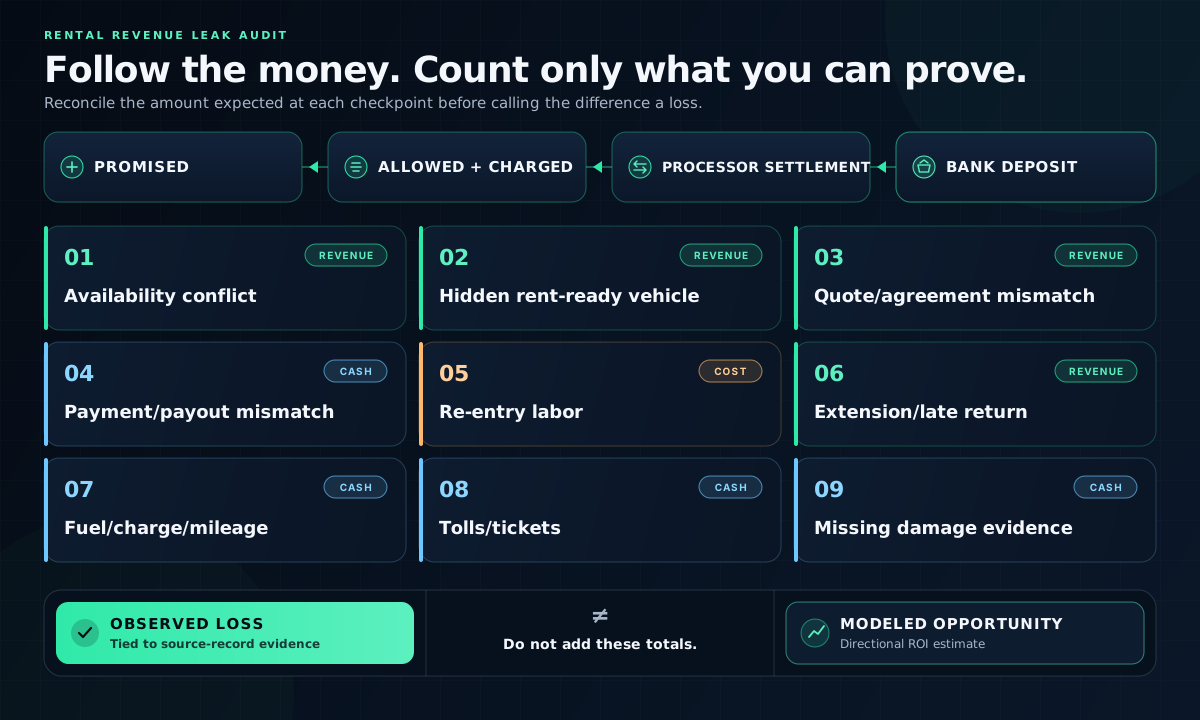
- Car rental revenue usually leaks at nine handoffs between reservation and bank deposit, whether you use spreadsheets, partially connected software, or both.
- Stale vehicle status creates two different problems: you can promise a car that is unavailable or turn away demand while a rent-ready unit sits idle.
- Accepted rates, extensions, fuel, mileage, tolls, and damage charges leak when operational changes never reach the agreement or final bill.
- Billed revenue can still stall in open balances, processor settlements, chargebacks, or bank payouts, so payment reconciliation needs its own control.
- Repeated data entry consumes counter capacity, while scattered return and condition records make delayed charges harder to support.
- Audit the handoffs for one month, fix the largest verified gap first, and use the ROI calculator to model future upside separately.
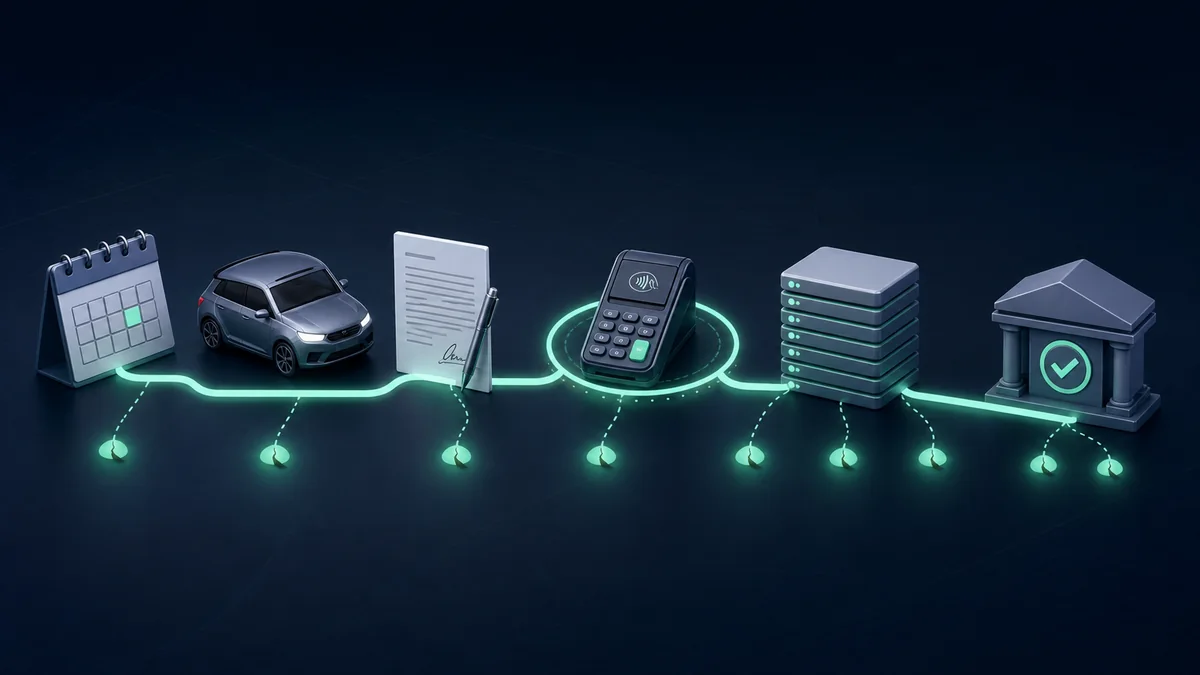
Where the nine leaks appear in the rental money trail
Rental revenue tends to leak in nine repeatable places between the first quote and the bank deposit. You see the symptoms at the counter and weeks later: a downgrade, an unbilled extension, a payout variance, or a damage charge you cannot support.
Spreadsheets are a common example because teams use them to bridge reservations, agreements, payments, and returns. The same breaks appear when rental and accounting systems share only part of the record. Auto Rental News profiled a practitioner using rental software, accounting software, and Excel together for financial oversight.
To close one rental, you need actual times, vehicle ID, agreement, odometer, fuel or charge level, extensions, tolls, condition, and payment status. The U.S. Government Rental Car Agreement records these separately. A connected rental platform can keep them together.
An audit of 25 operational spreadsheets confirmed 117 errors, 70 with a non-zero impact; nine workbooks had none. Measure the handoffs in your own operation before deciding whether the current process is adequate.
Audit one month. Compare what was promised, allowed, billed, settled, and deposited, and note the staff time spent repairing broken handoffs. The 2025 U.S. mean wage for counter and rental clerks was $21.97 before payroll burden, so repeated recovery work is not free.
The 9 rental revenue leaks
The leaks follow the life of a rental: vehicle availability, accepted price, agreement, payment, return, delayed charges, and the bank deposit. Most begin with a small break between records, people, or timing. Left alone, that break becomes a counter rescue, missed charge, unresolved balance, or disputed claim.
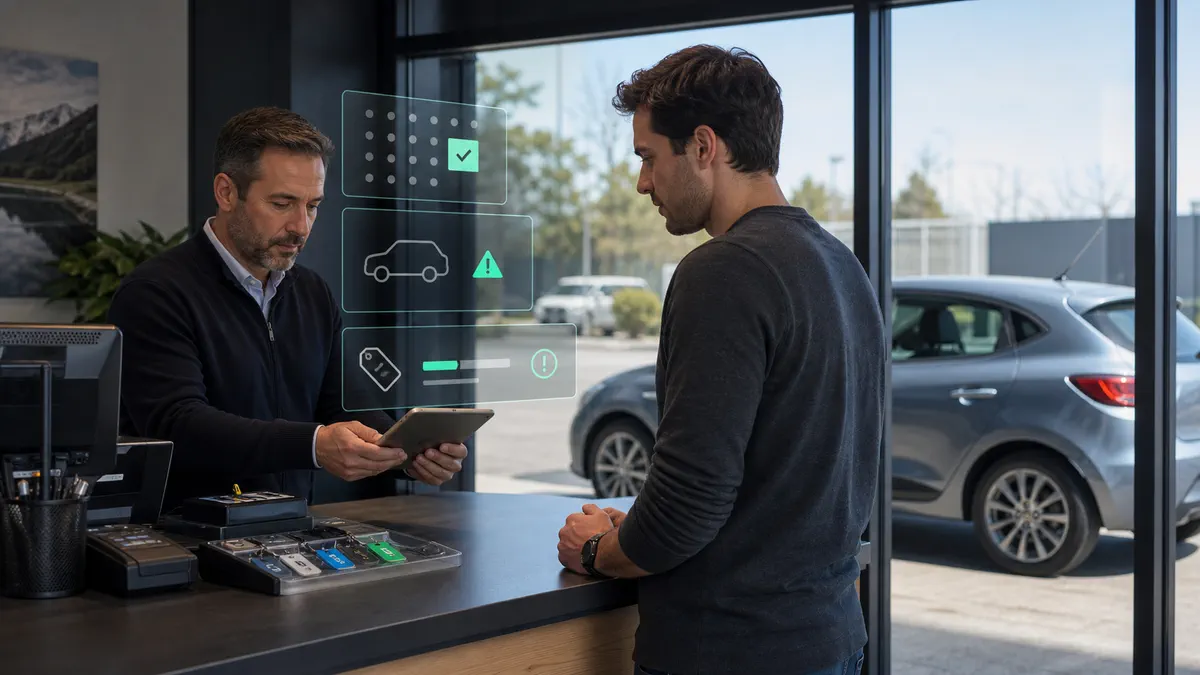
1. You promise a vehicle that is not available
The booking looks valid, but the assigned unit is already out, under maintenance, promised elsewhere, or still waiting on cleaning, fueling or charging, inspection, or repositioning. You discover the conflict at pickup, when the choices are an upgrade, replacement, delivery, goodwill credit, cancellation, or a long counter delay.
The Reservation Planner puts bookings, current availability, assignments, vehicle status, supported holds, and scheduled returns on one timeline. Configured status controls can keep a unit under service or repair out of bookable inventory, so staff review the exception before confirming the handoff.
Your team can catch known availability conflicts earlier, protect the next booking from a vehicle that is not ready, and reduce avoidable counter rescues while staff retain the final decision about road readiness and replacements.
2. A rent-ready vehicle stays hidden from sale
A clean, rent-ready vehicle still looks unavailable because its return status never changed, a no-show remains on hold, or a turnaround task was never closed. A caller hears that you are sold out while usable inventory sits on the lot and earns nothing.
Fleet Management keeps unit status, location, availability, supported holds, service history, and utilization context beside reservations and assignments. Counter and fleet teams can move a completed return into its next configured status and see which unit is truly bookable instead of working from separate lists.
Once staff update the unit's status, rent-ready capacity becomes visible to the people taking requests. Held vehicles can return to sale sooner, and your team can accept demand the fleet can serve without lowering the standard for vehicle readiness.

3. Your accepted quote and agreement do not match
A staff member copies an old seasonal rate, omits an accepted option, or rebuilds the quote from memory during agreement preparation. The error may survive pickup and leave the final bill below the price and terms the customer accepted.
Payments & Pricing builds estimates from configured dates, rate codes, fees, mileage rules, deposits, and selected options. Rental Agreements carries supported vehicle, renter, rate, coverage, add-on, deposit, charge, and term details forward so staff review the rental instead of re-keying the quote.
The agreed inputs remain visible from reservation through signature and final-charge review, reducing opportunities for a rate or option to disappear and giving staff a clearer record when the amount legitimately changes.
4. Your agreement balance, settlement, and bank deposit do not reconcile
The agreement shows one balance, the processor settles another amount, and the bank receives something different. An authorization may look reassuring without being revenue, while refunds, reserves, fees, chargebacks, timing, or an open balance leave someone tracing the gap at the end of the week.
RentWorks Plus keeps supported deposits, charges, cash entries, refunds, receipts, outstanding balances, and final payment activity with the reservation and agreement. Reporting & Analytics lets finance trace revenue activity back to the operating record; processor-batch and bank-payout reconciliation remain separate financial controls.
Finance starts with a linked rental record instead of disconnected notes, can separate explainable timing or fee differences from a truly unexplained balance, and can clear valid exceptions before they age into harder recovery work.
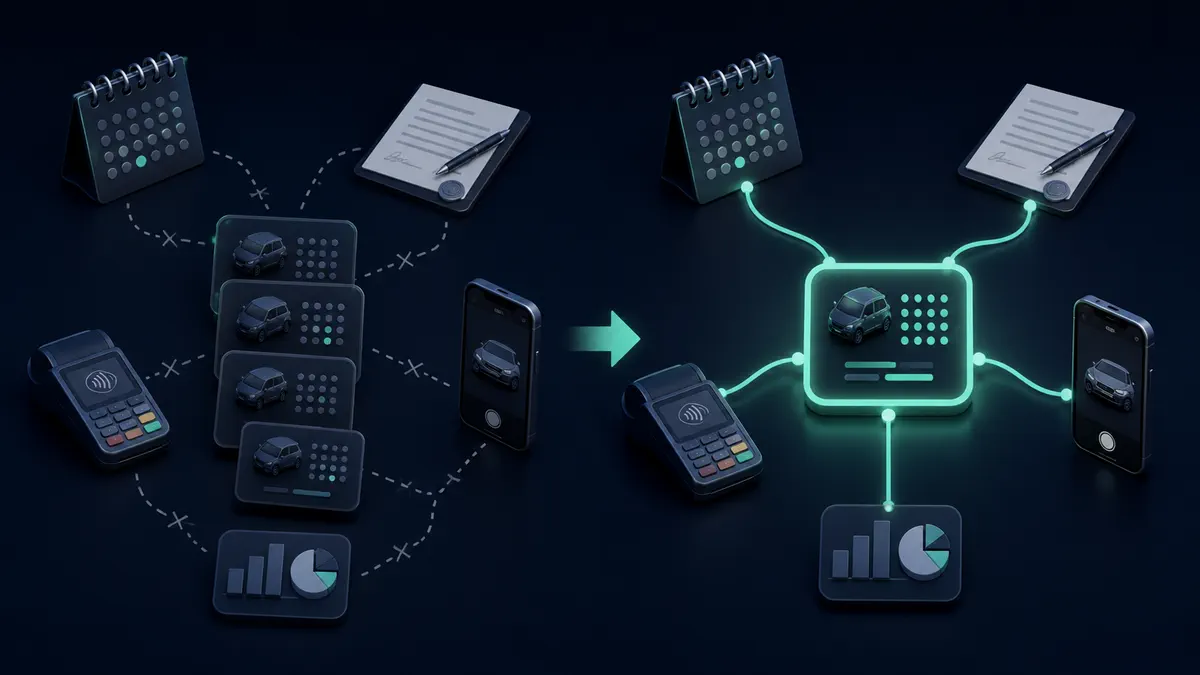
5. Your team re-enters the same rental
Your team retypes the same renter, vehicle, dates, rate, payment note, inspection detail, and return information into separate records. The renter waits while staff copy data already captured, and every new entry creates another chance for a typo or mismatch.
Supported reservation and customer details move into agreement preparation, while the assignment, signed agreement, payment activity, condition records, return, and reporting context stay tied to one rental. Counter Operations gives pickup and return staff that same operating record instead of asking them to rebuild it.
With fewer fields to re-enter, staff can spend less time copying and searching, counter handoffs can move faster, and there are fewer opportunities for transcription errors in the records finance or claims later relies on.
6. You miss an extension or late-return charge
The renter keeps the car another day, but the expected return, rate inputs, agreement, authorization or deposit, and next assignment still reflect the original date. One missed extension can hide the extra charge and create a second availability problem for the customer expecting that vehicle next.
RentWorks Plus supports reservation changes and keeps active rentals, expected returns, affected bookings, and vehicle assignments visible in the planner. Staff update the supported dates and rate inputs in the same rental context, review the agreement and balance, and handle any additional card authorization required by the payment provider's current rules.
The changed return date stays visible beside pricing, agreement, payment, and planning records, so staff can review the extra time for billing, protect the next assignment, and resolve one connected exception instead of repairing several stale records later.
7. Fuel, charge level, and mileage stay unbilled
The vehicle returns low on fuel or charge, over the mileage allowance, or without a key, charger, transponder, or other item, but the reading or evidence stays in a photo, paper note, or separate app. By the time billing reviews the agreement, the allowed charge is easy to miss or difficult to defend.
The guided return workflow keeps supported mileage and fuel readings, condition photos and notes—including notes about missing items—fuel adjustments, and configured charges with the rental and signed agreement. Where the Zubie integration is in scope, vehicle-reported odometer and fuel data can also reach the rental record for staff review.
Staff can review a valid return charge while the evidence is fresh, carry it into final billing, and explain the amount from one record instead of reconstructing the return after the vehicle has left the counter.

8. Tolls and tickets arrive without a rental match
A toll or ticket notice arrives weeks after return, and your team cannot quickly connect the plate and timestamp to the right renter and agreement. The notice becomes expensive when staff miss the recovery window, abandon the search, or charge the wrong customer and create a new dispute.
RentWorks Plus keeps the assigned vehicle, renter, agreement, and rental dates in one operating record, while Customer Accounts retains supported rental, balance, document, and payment history. Staff can use that history to identify the responsible rental before applying the evidence, notice, payment, and deadline rules for the relevant network or jurisdiction.
Delayed notices are easier to match correctly, eligible recovery can begin before the deadline, and your team has a clearer record for explaining the charge or deciding that the evidence does not support it.
9. Damage has no usable evidence trail
A new scratch appears at return, but the pickup photos, signed agreement, estimate, customer communication, authorization, and payment history sit in different places. A camera-roll image alone does not show what changed, what the agreement covers, or whether the evidence supports a delayed charge.
Inspections & Claims keeps structured pickup and return condition records with the rental and vehicle history. The working claim record can hold supported documents, expenses, payment activity, settlements, status, and subrogation work; the optional AI-assisted inspection capability can flag possible photo differences for staff review.
Claims, fleet, finance, and management can review one evidence trail, making a valid charge easier to explain and support and an unsupported charge easier to reject. The workflow strengthens the record; it does not decide liability or guarantee recovery.
How the leaks compound
The nine leaks rarely stay isolated. A late return can leave an extension unbilled and force a rescue for the next customer. Missing return evidence can weaken a charge, trigger a dispute, and leave an open balance that takes weeks to resolve.
That chain matters because the most visible problem is often downstream from the original break. The payout variance may begin with a stale agreement; the damage write-off may begin with a pickup inspection nobody can find.
Trace the problem back to the first broken handoff. Fixing the source usually prevents more loss than adding another end-of-month check. Keep future upside from the ROI calculator separate from what your records show happened.
When the nine leaks are low-risk enough to leave alone
Your current process may be adequate when one person runs a small fleet with few overlaps or exceptions, every handoff has an owner, and a monthly audit finds little or no loss. Protect shared records, store evidence in a consistent place, and reconcile open balances. Excel can remain useful for analysis even if live operations move elsewhere.
Fleet count alone cannot set the threshold. Risk rises when a small rental team adds editors or booking channels, handles after-hours extensions, or cannot trace amounts to the bank. Change the process or system when a measured leak costs more than the fix. Software cannot repair a vague policy.
If several breaks feel familiar, score your rental operation before you change systems.
What RentWorks Plus connects
RentWorks Plus connects reservations, fleet, payments, pricing, inspections, claims, and reporting in one cloud workspace.
For one published provider metric, the optional AI Inspection add-on is powered by Self Inspection, which reports 20–30% more damage recovered and condition reports generated in under one minute. These are Self Inspection-reported figures, not results measured across RentWorks Plus customers or a guarantee; results vary by workflow, configuration, and package.
Bluebird supports 1,000+ customers in 70+ countries and has built rental software since 1982. Those figures describe Bluebird's operating history, not the result any one fleet will achieve.
Frequently Asked Questions
Where does car rental revenue leak most often?
Revenue tends to leak at nine repeatable handoffs between the first quote and the bank deposit: vehicle availability, rent-ready status, the accepted quote against the agreement, payment and payout reconciliation, repeated data entry, extensions and late returns, fuel or charge level and mileage, tolls and tickets, and damage evidence.
How do I audit my rental handoffs for revenue leaks?
Audit one month. For each rental, compare what was promised, allowed, billed, settled, and deposited, and note the staff time spent repairing broken handoffs. Measure your own operation before deciding whether the current process is adequate.
Which revenue leak should I fix first?
Trace each problem back to the first broken handoff rather than the most visible symptom: a payout variance may begin with a stale agreement, and a damage write-off with a pickup inspection nobody can find. Fixing the source usually prevents more loss than adding another end-of-month check.
How should a rental business track deposits and card holds?
Keep the authorization, incremental authorizations, settled charges, reversals, refunds, processor batch, bank payout, and open agreement balance linked to the same rental. A hold is not revenue.
Is a spreadsheet good enough to run a car rental business?
Yes, when one person runs a small, low-volume operation with few overlaps and a monthly audit finds little or no loss. Risk rises when availability, rates, payments, condition evidence, and returns require repeated reconciliation across people or channels.
How do you calculate ROI for car rental software?
Use ROI = (annual benefit - annual cost) / annual cost x 100. Include implementation in first-year cost. Keep proven historical losses separate from modeled gains, and test every assumption against your records.
Estimate the upside of fixing the leaks
Revenue leakage rarely appears as one obvious line item. It shows up in the gaps between a booking, agreement, return, settlement, and deposit. Follow one month of rentals through those handoffs, find the first break behind the largest repeated gap, and fix that break first.
Then estimate your annual opportunity with the RentWorks Plus ROI Calculator. It is free and takes about two minutes. It models fleet size, average daily rate, utilization, staffing, downtime, unrecovered damage, call volume, and after-hours bookings. Keep its assumptions beside your audit, validate them against your records, and do not add the estimate to your historical leak total.